
I spend a lot of time reading other people's FiveM scripts. Some of it is research, some of it is curiosity, and honestly some of it is just that I can't help opening a client.lua the way other people can't help checking their phone. And after enough of that, you start seeing the same handful of mistakes over and over — not exotic bugs, just patterns. Ways of writing code that technically work on an empty test server and then quietly fall apart the moment thirty real players show up.
The tricky thing about anti-patterns is that most of them don't announce themselves. Your script loads, the feature works when you test it alone, the release thread gets a few likes. The damage shows up later — as server hitches nobody can trace, as an economy that slowly inflates, as a "why can't I get my car out of the garage" ticket that turns out to be three resources fighting over the same value.
So I want to walk through the ones I see most, sorted roughly by how hard they are to catch. We'll start with the stuff you can spot by eye, move into the ones that need you to actually think about how the server behaves, and end with the quiet, critical ones that don't look like bugs at all until someone exploits them. Every point here is something I've either seen in a real release or run into myself.
One honest disclaimer up front: I link real free forum releases as examples, because concrete beats hypothetical every time. This isn't about dunking on anyone — most of these authors gave their work away for free, which is more than a lot of us do. The point is the pattern, not the person.
The three tiers, and why "easy to spot" isn't the same as "low impact"
Before the list, one framing that's saved me a lot of grief. How visible a mistake is and how much damage it does are two completely different axes. A missing Wait crashes your client instantly — extremely visible, and you'll fix it in ten seconds. A missing server-side check does nothing at all until a cheater finds it six months in, and then it drains your economy overnight.
So as we go from "easy" to "critical" here, we're not going from small to big. We're going from loud to silent. The loud ones train you. The silent ones are the ones that actually take servers down.
TIER ONE — EASY TO SPOT. These are the anti-patterns you can catch just by reading, no server needed. If you're reviewing a script before you buy or install it, this is your first pass.
1. The unyielding loop (or the near-unyielding one)
The most famous FiveM footgun. A loop that never yields hangs the entire thread — and because everything in a resource shares that scheduler, an infinite loop with no Wait can freeze your whole client or server solid.
-- This will hang everything.
while true do
    doSomething()
    -- no Wait() -- the thread never gives control back
end
Everyone learns this one fast, because it fails so hard you can't miss it. The Cfx.re docs on Citizen.CreateThread spell it out: a CreateThread loop needs a Wait inside it or it starves the scheduler.
But the sneakier version of this isn't the missing Wait — it's the too-frequent one. Wait(0) runs your loop every single frame. That's correct and necessary for things that genuinely must draw every frame (like DrawMarker or DrawText3D), but people reach for it reflexively for logic that has no business running 60-plus times a second.
-- Checking a job status every frame? Why?
CreateThread(function()
    while true do
        local job = getPlayerJob()   -- runs ~144×/sec on a 144Hz monitor
        updateHud(job)
        Wait(0)
    end
end)
A subtlety a lot of people get backwards: if something must run every frame, use Wait(0), not Wait(5) or Wait(10). On a high-refresh monitor, a fixed millisecond wait actually skips frames and makes per-frame work look janky. Wait(0) means "next frame, whatever the framerate is." Save the bigger waits for logic that genuinely doesn't need frame precision — a job check is fine at Wait(1000).
The fix is just to ask "how often does this actually need to happen?" and set the wait accordingly. A HUD value that changes when your job changes can poll once a second, or better, only update when it's pushed a change. This is the single cheapest performance win in FiveM and it costs you nothing but a moment of thought.
2. Doing expensive work every frame instead of throttling it
This is the same instinct as above but it shows up specifically around drawing and distance checks, and it's worth its own section because it's everywhere. DrawMarker and DrawText3D genuinely have to run every frame to appear — that part's unavoidable. What's avoidable is running the distance math and the loop over every marker every frame, including the markers that are 300 metres away and invisible.
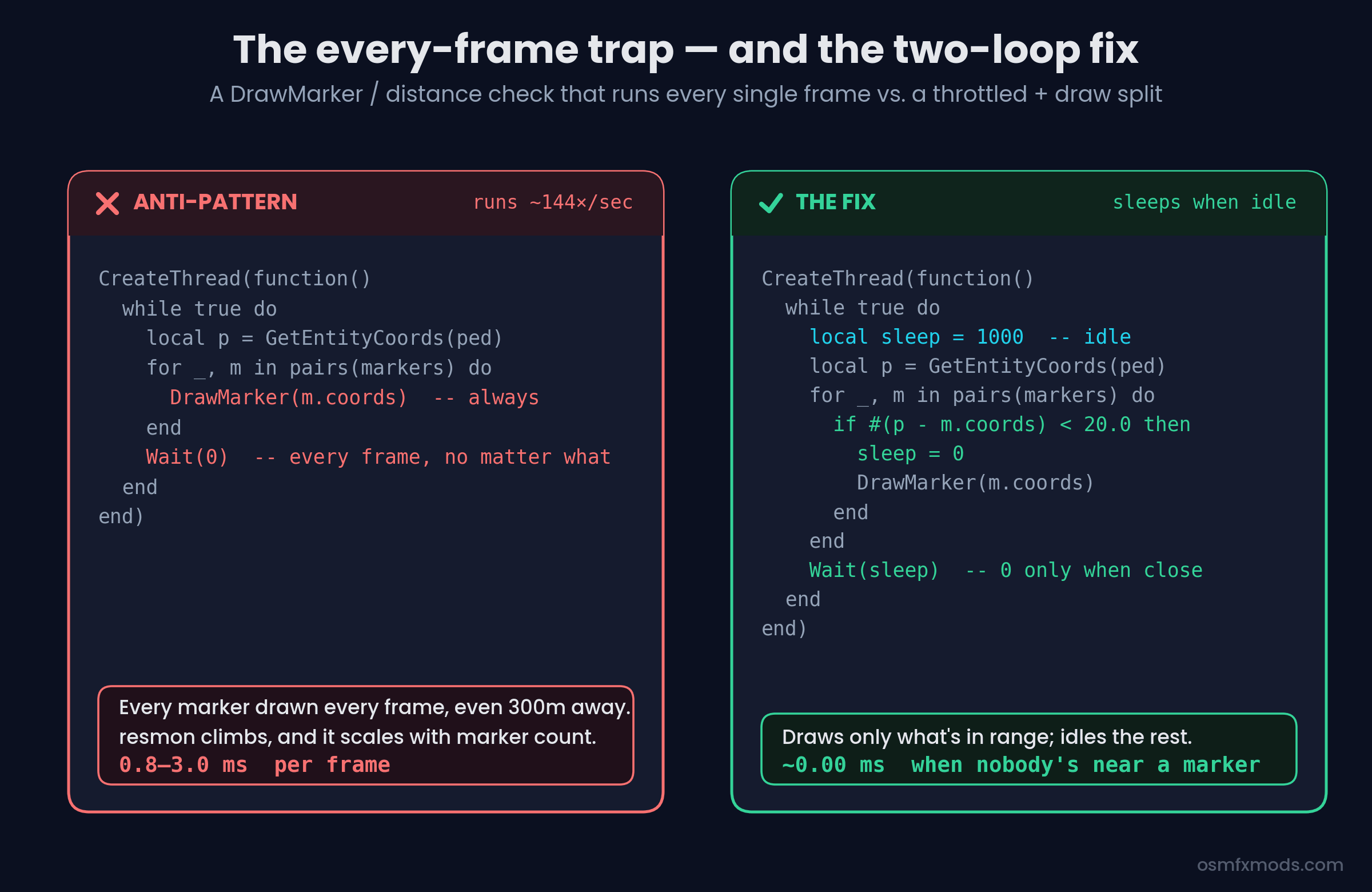 Side-by-side diagram: on the left an anti-pattern loop that runs DrawMarker for every marker every frame with Wait(0), costing 0.8 to 3 milliseconds per frame; on the right the fix, a single loop that sets sleep to 1000 by default and only drops to Wait(0) and draws when a marker is within 20 units, costing near zero when idle
The pattern that fixes it is the "dynamic sleep" loop: default to a long wait, and only drop to Wait(0) when the player is actually near something that needs per-frame drawing.
CreateThread(function()
    while true do
        local sleep = 1000
        local p = GetEntityCoords(PlayerPedId())
        for _, m in pairs(markers) do
            if #(p - m.coords) < 20.0 then
                sleep = 0
                DrawMarker(--[[ ...m.coords... ]])
            end
        end
        Wait(sleep)
    end
end)
When nobody's near a marker, that loop sleeps a full second and costs essentially nothing on resmon. When you walk up to one, it snaps to per-frame drawing. Same visual result, a fraction of the cost. The community performance guides have been preaching this for years and it still gets ignored constantly.
One small companion habit while you're in here: use #(vectorA - vectorB) for distance, not GetDistanceBetweenCoords. The vector-length operator is a native Lua operation and measurably faster than the native call — small on its own, but it's the kind of thing that runs thousands of times a second.
3. Re-fetching things that never change (or that you already have)
The third eye-catchable one: calling the same native over and over when one call would do. The classic is PlayerPedId() — I've genuinely seen scripts call it a dozen-plus times inside a single function, when the ped handle is the same for the whole call.
-- Anti-pattern: same handle, fetched five times
SetEntityHealth(PlayerPedId(), 200)
local coords = GetEntityCoords(PlayerPedId())
if IsPedInAnyVehicle(PlayerPedId(), false) then
    TaskLeaveVehicle(PlayerPedId(), GetVehiclePedIsIn(PlayerPedId()), 0)
end-- Fix: fetch once, reuse
local ped = PlayerPedId()
SetEntityHealth(ped, 200)
local coords = GetEntityCoords(ped)
if IsPedInAnyVehicle(ped, false) then
TaskLeaveVehicle(ped, GetVehiclePedIsIn(ped), 0)
endIndividually these calls are cheap. But cache them anyway — partly for the tiny performance gain, mostly because the cached version is easier to read and reason about, and readability is what stops the next three tiers of bugs from creeping in. Clean local variables are a load-bearing habit, not a cosmetic one.
TIER TWO — MODERATE. Now it gets less visual. These don't look wrong on the page. You have to understand how the server actually behaves over time, across players, to see the problem.
4. Polling the server on a timer when an event would do
Here's one straight from a real release. While reviewing a free ESX plate-switcher script on the forums, I found this on the client:
while true do
    TriggerServerEvent('nkhd_changePlate:getIdentifier')
    TriggerServerEvent('nkhd_changePlate:getPlateData')
    Citizen.Wait(100)
end
Read that carefully. Every client, ten times a second, forever, fires two server events — and on the server those events run database queries. So you've built a system where a hundred connected players generate two thousand database round-trips per second, whether or not anything changed. The data it's fetching updates maybe once every few minutes when someone tapes a plate. It's polling a mailbox ten times a second for a letter that arrives twice a day.
This is the pattern to internalise: don't poll for state that changes rarely — push it when it changes. The server already knows the moment the plate data changes, because it's the one changing it. So have it TriggerClientEvent the affected client(s) at that moment, and let the client sit quietly the rest of the time. You go from thousands of queries a second to a handful an hour. For truly shared state, this is also exactly what state bags exist for — set a value once and it syncs to whoever needs it.
5. Global state where per-player state belongs
This one is genuinely subtle and it was hiding in that same plate-switcher. The client stored fetched data into plain globals:
RegisterNetEvent('nkhd_changePlate:receivePlateSwitcherData')
AddEventHandler('nkhd_changePlate:receivePlateSwitcherData', function(data)
    for _, row in ipairs(data) do
        identifiern = row.identifier   -- global, overwritten each row
        platen      = row.plate
        modeln      = row.model
    end
end)
That loop doesn't collect the data — it walks the whole dataset and keeps only the last row. Because those variables are global and unscoped, each client ends up tracking whatever the most recently taped vehicle on the entire server was.
Play it forward. Player A tapes their car. Later, Player C tapes theirs. Player A's identifiern just got silently overwritten with Player C's identifier. So when Player A tries to un-tape their own vehicle, the ownership check:
if identifiert == identifiern thennow fails, because identifiern belongs to Player C. In practice only the last person to tape anything can un-tape. Everyone else is locked out of their own action, and nobody can figure out why because the code "looks fine."
The lesson isn't about plates. It's that any time data belongs to a specific player or entity, it needs to be scoped to that player or entity — a table keyed by identifier, a state bag on the entity, something with a per-owner slot. The moment you stash per-player data in a shared global, you've built a race condition that only shows up with more than one player online. Which is exactly why it survives testing and dies on launch night.
6. Never cleaning up what you spawn
Resources start and stop constantly on a live server — restarts, updates, crashes, txAdmin doing its thing. If your script spawns entities, opens threads, or creates blips and never cleans them up on stop, you leak. Restart a vehicle-spawner resource a few times and you'll find orphaned vehicles piling up in the network object viewer, each one still eating a network slot.
The habit that prevents it is an onResourceStop handler that tears down everything the resource created:
local spawnedEntities = {}

AddEventHandler('onResourceStop', function(res)
    if res ~= GetCurrentResourceName() then return end
    for _, entity in ipairs(spawnedEntities) do
        if DoesEntityExist(entity) then
            DeleteEntity(entity)
        end
    end
end)
One real gotcha here, per the Cfx docs on onResourceStop: cleanup that relies on async operations or promises may not finish, because the resource is being torn down. Keep your stop-handler cleanup synchronous — delete entities, save critical data with a blocking call — don't kick off a promise chain and assume it resolves.
You won't notice a missing cleanup handler in a quick test. You notice it three weeks in, when the server's been up for days and something feels heavier than it should.
TIER THREE — CRITICAL. Here's where it stops being about performance and starts being about whether your server survives contact with a motivated player. These don't crash anything. They don't show up on resmon. They look completely normal right up until someone exploits them — and by then it's your economy, your database, or every player's security on the line.
7. Trusting the client — the mistake that costs servers their economy
If you take one thing from this whole post, take this. The client is in the hands of the player, and the player might be running a cheat menu. Any event you register with RegisterNetEvent can be triggered by any client, with any arguments they choose. A Lua executor makes TriggerServerEvent('bank:deposit', 99999999) as easy as typing it.
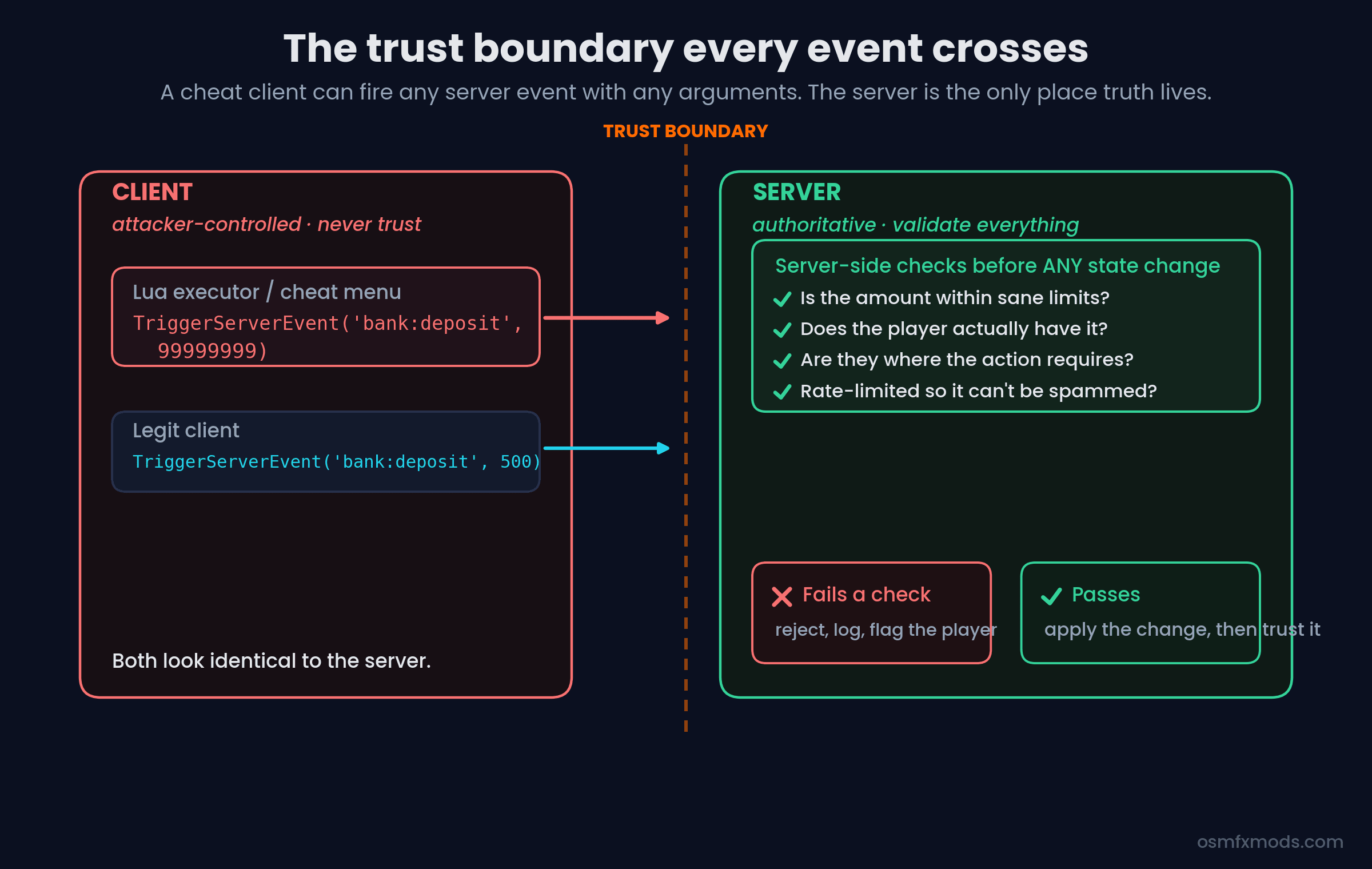 Diagram of the client-server trust boundary: on the left, a client where both a legit deposit of 500 and a cheat-menu deposit of 99999999 look identical crossing the boundary; on the right, the authoritative server running validation checks — sane limits, does the player have it, are they in range, is it rate-limited — before applying any change, rejecting and flagging anything that fails
So the anti-pattern is any server event that takes the client's word for something that matters. The Cfx.re server-security guide gives the canonical bad example:
-- NEVER do this. The client picks the item and the count.
RegisterNetEvent('job:givePlayerItem', function(item, count)
    local ply = FX.GetPlayerFromSource(source)
    ply.addItem(item, count)   -- free anything, any amount
end)
Nothing stops a player from calling that with ('goldbar', 9999). The fix isn't a single line — it's a mindset. Every event that changes money, items, or state must re-derive the truth on the server: does this player actually have an active job? Are they physically where the action requires? Is the amount within sane bounds? Have they done this suspiciously often? The docs' secure example gates item-giving behind a server-tracked job state and a distance check, and resets that state after use so it can't be replayed. That's the shape you want.
Three concrete habits that go a long way:
First, register events in the right context. Use RegisterNetEvent only for events that genuinely need to cross client↔server. For internal events, AddEventHandler keeps them non-networked so a cheat client can't reach them at all. You can even hard-block same-context calls by checking if source ~= 65535 then return end on server events that should only ever come from the server itself.
Second, validate every input as if it's hostile, because it might be. Never addItem(item, count) from raw client arguments.
Third, rate-limit anything that touches the economy, so even a "valid" event can't be spammed a thousand times a second to duplicate money or farm items.
8. Building SQL by pasting strings together
This is the one that keeps me up a little. SQL injection is ancient, well-understood, and still shows up in FiveM resources — usually anywhere user input reaches the database. The pattern looks harmless:
-- Vulnerable: the player's input becomes part of the query.
MySQL.Async.execute("UPDATE players SET name = '" .. newName .. "'")
If newName is a normal name, fine. If newName is ', money = 999999 WHERE 1=1 -- , you've just handed a player the ability to rewrite your entire players table. Any input field — a character name, a /report reason box, an admin note — is a door if you concatenate it straight into SQL. There are real FiveM admin panels that shipped with exactly this hole.
The fix is total and simple: always use parameterized queries. Every modern FiveM database layer — oxmysql, mysql-async — supports ? placeholders that bind values safely instead of splicing them into the query text:
-- Safe: the value can never be interpreted as SQL.
MySQL.update('UPDATE players SET name = ? WHERE identifier = ?', {
    newName, identifier
})
With placeholders, newName is always treated as a string value, never as query structure, no matter what characters it contains. There is essentially never a good reason to concatenate user input into a query. If you see .. someVariable .. inside a SQL string in a resource you're evaluating, treat it as a red flag and go read the rest of that resource carefully — where there's one, there are usually more.
9. Assuming entities and their sync state are always there
The most invisible one, and the hardest to reason about, because it's about timing and ownership in a networked game. In OneSync, entities are owned by whichever client is closest / streaming them, ownership migrates as players move, and a network ID you got a moment ago might refer to an entity that no longer exists on your client — or that you don't own and therefore can't modify.
The anti-pattern is code that assumes an entity handle is always valid and always yours:
-- Fragile: assumes the entity exists and is controllable right now.
local veh = NetworkGetEntityFromNetworkId(netId)
SetVehicleDoorsLocked(veh, 2)   -- may silently do nothing
If that vehicle isn't streamed on your client, or another client owns it, this can quietly fail — no error, just nothing happens. And state bags only sync reliably once an entity is properly networked and within range, so setting a state bag on an entity you've just requested, before it actually exists everywhere, leads to values that mysteriously don't propagate.
There's no one-line fix, but the defensive habits are: always guard with DoesEntityExist before you touch a handle; if you must modify an entity you don't own, request control and wait for it rather than assuming; prefer server-side entity creation and state for things that must be authoritative; and remember that a network ID is a reference across the session, not a guarantee the thing is on your screen right now. This is the category of bug that produces "it works for me but not for my friend" reports, and the reason is almost always that two clients disagreed about who owned what, and when.
This tier is exactly where the gap between "works in my test" and "works on a 200-player server" lives. You physically cannot reproduce most ownership and sync issues alone, because they require multiple clients disagreeing about the same entity. If you build networked features, you have to test them networked.
Zooming out: the pattern behind the patterns
If you line all nine up, there's a single thread running through them. The easy ones are about respecting the frame — not doing work the game doesn't need done. The moderate ones are about respecting time and other players — data that's scoped correctly and pushed instead of polled. And the critical ones are all one idea wearing different clothes: decide where the truth lives, and never trust anything on the wrong side of that line. The client isn't the truth. A network ID isn't a guarantee. A raw string isn't safe input.
None of this requires being a genius. It requires slowing down for a second and asking who owns this data, how often does this really need to run, and what happens when the person on the other end is hostile. That second of thought is, honestly, most of what separates a script that survives launch night from one that becomes a support ticket.
A resource that works when you test it alone is not a resource that works. It's a resource that hasn't been tested yet.
That's the whole game. The engine has rules about frames, about ownership, about trust — and good FiveM development is mostly learning where those rules are and building with them instead of finding out the hard way.
At OsmFX Mods this is basically our whole philosophy — performance-first, server-authoritative scripts for QBCore, ESX, and QBOX that are built to hold up under real player load, not just pass a solo test. If you'd rather install things that already got this stuff right, have a look around the store.
And if you've got a script you're not sure about, reviewing code like this is genuinely one of my favourite things to do — that's exactly the kind of thing we write about here.