
Almost every interaction system you've ever used in a FiveM server is quietly asking the same question: what is the player looking at right now? Pointing at a door to open it, aiming at a ped to check their ID, placing a prop where your crosshair lands, the little "press E" that appears only when you face the right object — all of that comes down to firing an invisible line into the world and asking what it hit.
That invisible line is a raycast. And the first time you go looking for a Raycast() function in FiveM, you won't find one. What you find instead is a family of natives with intimidating names like StartShapeTestLosProbe and GetShapeTestResult, a flags argument nobody explains, and forum threads full of people asking why their raycast "returns nothing." So let me actually walk through how this works under the hood — not just the copy-paste snippet, but why it's shaped the way it is, so the gotchas stop being mysterious.
The one-sentence answer
Here's the whole thing in a sentence, and then we'll unpack every word of it: FiveM doesn't give you an instant raycast — you start a shape test, then read the result once the engine has it (typically the following frame), and a set of flags decides what the ray is even allowed to hit.
If that already clears things up, great, the rest of this post is the details. If it raised more questions than it answered, that's the right reaction — because two things in there trip up basically everyone: the "start now, read later" split, and the flags.
The mental model: a ray, and what it's allowed to touch
Forget the native names for a second. Conceptually a raycast is dead simple. You have a start point and an end point — two sets of world coordinates — and the engine draws a straight line between them and tells you the first thing that line runs into.
In GTA's engine (and therefore FiveM) this is called a shape test, because a ray is just one shape you can cast. You can also sweep a sphere, a box, or a capsule through the world, but a straight line ("LOS probe", for line-of-sight) is by far the most common, so that's what we'll focus on.
When the ray hits something, the engine hands you four pieces of information:
- hit — did it hit anything at all? (a boolean)
- endCoords — the exact world position where it stopped
- surfaceNormal — the direction the hit surface is facing (useful for placing props flush against walls)
- entityHit — the handle of the entity it hit, or
0if it hit the map itself (a wall, the road, terrain)
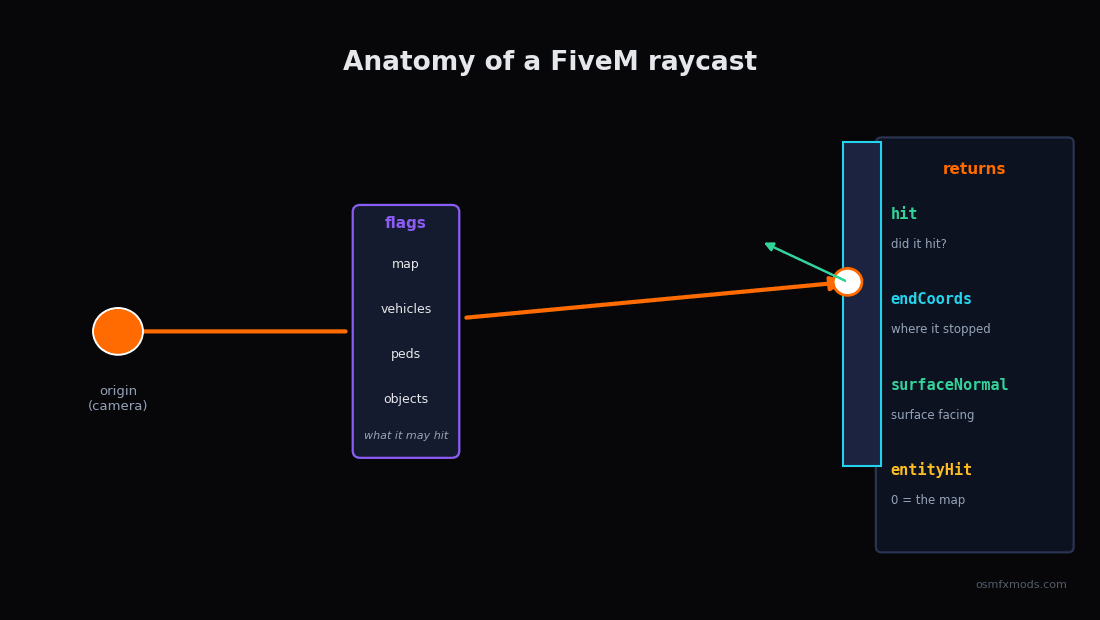 Diagram of a FiveM raycast: a camera on the left firing a ray to the right, the ray passing a flags gate (map, vehicles, peds, objects) before striking a hit point, with the four outputs hit, endCoords, surfaceNormal and entityHit labelled at the impact
That entityHit return is the quiet hero of interaction scripts. GetEntityType(entityHit) tells you instantly whether you hit a ped (1), a vehicle (2), or an object (3) — which is exactly how a targeting script knows whether to show you "talk to person" or "open trunk."
The part everyone gets wrong: it's asynchronous
Here's the design decision that confuses people. In most engines you'd call raycast(a, b) and get an answer back on the same line. FiveM's main shape test does not work that way. You call one native to kick off the test, and it immediately returns a handle — a little ticket number. The actual result isn't ready yet. You take that ticket to a second native, GetShapeTestResult, to collect the answer.
-- Step 1: start the test, get a handle back (result NOT ready yet)
local handle = StartShapeTestLosProbe(
    startX, startY, startZ,   -- ray origin
    endX, endY, endZ,         -- ray destination
    flags,                    -- what it's allowed to hit (more on this below)
    ignoreEntity,             -- an entity to skip (usually the player ped)
    7                         -- p8, conventionally 7
)

-- Step 2: collect the result
local retval, hit, endCoords, surfaceNormal, entityHit = GetShapeTestResult(handle)
FiveM officially documents this native as StartShapeTestLosProbe; you'll also see older examples and community wrappers refer to it as StartShapeTestRay. Notice the second native returns the values in Lua rather than filling in pointers like the raw C signature suggests; the FiveM Lua runtime handles that unpacking for you.
The catch is that first return value, retval. It's a status code — the one you actually need to care about is 1, which means "not ready yet, ask again":
So the correct pattern for an asynchronous shape test is to poll: start it, then keep calling GetShapeTestResult until the status is no longer 1, waiting a frame between tries. Don't assume a fixed number of frames — just loop until it's ready.
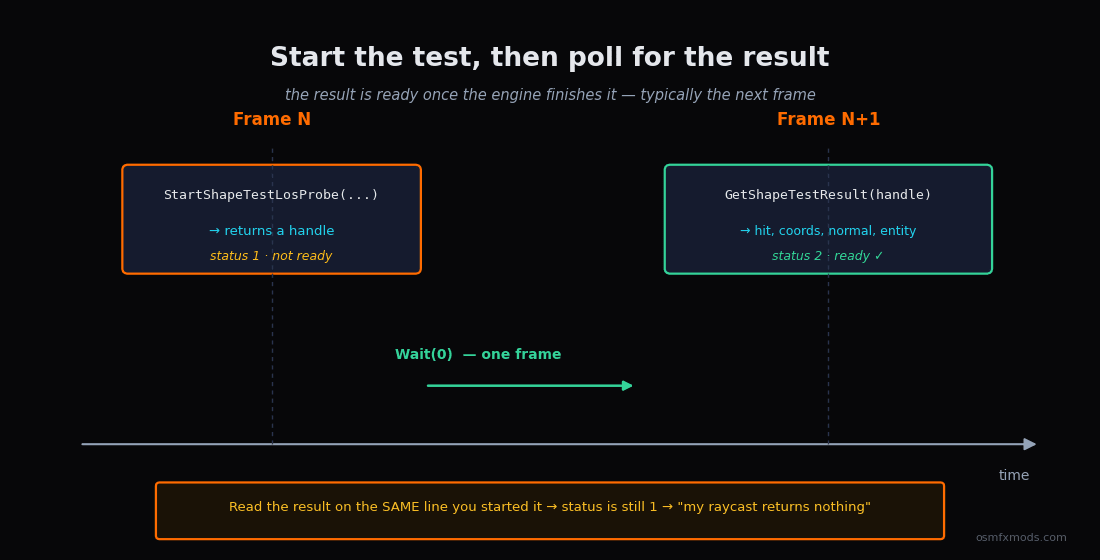 Timeline diagram of an asynchronous shape test: StartShapeTestLosProbe returns a handle with status 1 (not ready), then after a Wait you poll GetShapeTestResult until it returns status 2 (ready) with the hit data, typically the following frame
local function castRay(startCoords, endCoords, flags, ignoreEntity)
    local handle = StartShapeTestLosProbe(
        startCoords.x, startCoords.y, startCoords.z,
        endCoords.x, endCoords.y, endCoords.z,
        flags, ignoreEntity, 7
    )

    local retval, hit, worldCoords, surfaceNormal, entityHit
    repeat
        Wait(0)  -- let a frame pass so the engine can finish the test
        retval, hit, worldCoords, surfaceNormal, entityHit = GetShapeTestResult(handle)
    until retval ~= 1  -- 1 means "still computing" — loop until it's not

    return hit, worldCoords, surfaceNormal, entityHit
end
There is a synchronous version — StartExpensiveSynchronousShapeTestLosProbe — whose result is ready on the very next GetShapeTestResult call, no polling loop needed. It's named "expensive" for a reason: it blocks the frame until the test finishes. For one-off, on-demand casts (the player pressed a key) it's perfectly fine and simpler to write. For anything you're firing continuously, stick with the async version.
Why the async split at all? Because a shape test isn't free — it runs against the physics world — and the engine wants to batch that work rather than stall your thread mid-frame every time you ask. Once you internalise "start now, read once it's ready," ninety percent of the "my raycast returns nothing" confusion disappears: people are reading the result on the same line they started it, before the engine has had a chance to answer.
"What am I looking at?" — the camera raycast
The single most common use is casting a ray straight out of the player's camera, so you can tell what they're aiming at. There's no native that does this in one call — you build the ray yourself from the camera's position and rotation.
The origin is easy: GetGameplayCamCoord(). The direction takes a little trigonometry, converting the camera's rotation into a forward vector:
local function rotationToDirection(rotation)
    local z = math.rad(rotation.z)
    local x = math.rad(rotation.x)
    local num = math.abs(math.cos(x))
    return vector3(
        -math.sin(z) * num,
         math.cos(z) * num,
         math.sin(x)
    )
end

local function getCameraTargetCoords(distance)
    local camCoord  = GetGameplayCamCoord()
    local camRot    = GetGameplayCamRot(2)
    local direction = rotationToDirection(camRot)

    local dest = vector3(
        camCoord.x + direction.x * distance,
        camCoord.y + direction.y * distance,
        camCoord.z + direction.z * distance
    )
    return camCoord, dest
end
Put those together and you've got a working "look at" cast. Here the ray starts at the camera, shoots 50.0 units forward, and ignores the player's own ped so you don't just hit yourself:
CreateThread(function()
    while true do
        Wait(0)
        if IsControlJustReleased(0, 38) then  -- E key
            local ped = PlayerPedId()
            local from, to = getCameraTargetCoords(50.0)

            local hit, coords, normal, entity =
                castRay(from, to, -1, ped)  -- -1 = hit everything

            if hit then
                if entity ~= 0 then
                    print(('Hit entity %d (type %d)'):format(entity, GetEntityType(entity)))
                else
                    print(('Hit the map at %s'):format(coords))
                end
            end
        end
    end
end)
That's the skeleton behind every third-eye / targeting resource you've used. qb-target, ox_target, interaction menus — under all the polish, they're firing a camera ray and reacting to entityHit.
The flags: what your ray is allowed to hit
This is the argument nobody explains and everyone copies blindly. The flags value is a bitmask that tells the shape test which categories of thing it should collide with. Leave out a category and the ray passes straight through it as if it weren't there — which is exactly why so many "my raycast ignores vehicles" posts exist. The ray isn't broken; the flag for vehicles just wasn't set.
The values people rely on in practice:
| Flag | Hits |
|---|---|
| 1 | Map / world geometry (buildings, terrain, roads) |
| 2 | Vehicles |
| 4 | Peds (non-player) |
| 16 | Objects & props |
| -1 | Everything |
Because it's a bitmask, you combine categories by adding them. Want only the map and vehicles? 1 + 2 = 3. Only props and peds? 4 + 16 = 20. And -1 is the "hit anything" catch-all, which is what most interaction casts use.
An honesty note on these values: FiveM exposes the trace flags as a plain integer and doesn't officially document what each individual bit means. The mappings above are the ones the community has settled on through testing and GTA native research, and they're reliable for everyday use — but if you're doing something precise with a less-common bit, verify it behaves the way you expect in your own build rather than trusting a table. When in doubt, -1 (hit everything) and then filter by GetEntityType on the result is the robust approach.
One flag habit worth keeping: being selective isn't just about correctness — it's cheaper. A ray that only tests against objects does less work than one testing against everything, which adds up if you're casting every frame.
Gotchas that cost people an afternoon
A few things that aren't obvious until they bite you:
This is client-side only. Shape tests run against the local physics/streaming world, so they live on the client. There's no server-side raycast — the server doesn't have the streamed collision geometry to test against. If the server needs to know what someone's looking at, the client casts the ray and reports the result (and then, per good server-authoritative design, the server validates that result rather than trusting it blindly).
entityHit == 0 means you hit the world, not nothing. A common mix-up: people check entity ~= 0 to mean "hit something." But hit can be true with entityHit at 0 — that's a wall or the road. Use the hit boolean to know whether you hit, and entityHit to know what.
The surface normal is not a world coordinate. surfaceNormal is a direction (which way the hit surface faces), not a position. It's gold for placing objects flush against a wall or aligning a decal, but if you try to treat it like endCoords you'll get nonsense.
Don't fire one every single frame if you don't need to. A camera ray in a Wait(0) loop runs your shape test 60-plus times a second forever. For a "press E to interact" feature you only need to cast when the player presses E, or throttle a continuous highlight cast to something like every 200–300ms. This is the same dynamic-sleep discipline that keeps any FiveM loop off your resmon — casting rays is cheap individually and expensive in bulk.
If you want the deeper version of that last point — why Wait(0) loops and un-throttled per-frame work quietly wreck server performance — I went through it in detail in our post on FiveM coding anti-patterns. Raycasting is one of the classic places that mistake hides.
Zooming out
Raycasting feels like a big scary systems topic until you see the shape of it: it's a line, a handle you cash in a frame later, and a bitmask that decides what counts. Once those three ideas click, the whole family of interaction features — targeting, prop placement, "look at to interact," aiming logic, even parts of how weapons and cameras reason about the world — stops looking like magic and starts looking like the same small pattern reused.
That's honestly the theme of most FiveM engine work. The natives have odd names and the docs are terse, but underneath there's usually one clean idea the engine is nudging you toward. Learn where that idea is, build with it, and your interaction systems end up both simpler and faster than the copy-pasted version.
A raycast doesn't tell you what's there. It tells you what's there right now, on this client, along this exact line. Respect that, and half the weird bugs never happen.
At OsmFX Mods we build interaction-heavy scripts for QBCore, ESX, and QBOX — targeting, placement, and "look at it to use it" systems that are cast efficiently and validated server-side, not fired blindly every frame. If you'd rather install things that already handle this cleanly, take a look around the store.
And if you're building your own targeting system and something's behaving strangely, this is exactly the kind of problem I enjoy digging into — that's most of what we write about here.