
Walk up to an ATM in most FiveM servers and you get a menu that opens in front of the world — a fullscreen NUI panel floating over the game. It works, but it always breaks the illusion a little. Your camera is standing at the machine, and yet the interface is pasted across your whole monitor.
So when we built our ATM system, we wanted the interface to live on the machine — a real, animated banking UI rendered onto the actual ATM screen texture, warping and sitting in 3D space exactly where your eyes expect it. Card animations, a keypad, balance screens, the works, all glued to the prop.
That's not a fancier NUI. It's a completely different rendering path called DUI, and it comes with one genuinely tricky problem nobody warns you about. Let me walk through how it actually works — and then the part that took the longest to get right.
The short version: NUI draws a web page over your whole screen. DUI draws that same web page onto a texture, and you paint that texture onto any surface in the world — a screen, a billboard, a cinema. The catch is that a texture floating in 3D space has no mouse cursor, so making it clickable is a puzzle all its own.
NUI vs DUI: same web page, very different destination
If you've read our post on how FiveM renders your UI, you already know the important bit: your UI is a web page running inside an embedded Chromium browser (CEF), and FiveM composites that on top of the game at the end of each frame.
Normal NUI takes that browser output and stretches it across your entire screen. That's why an inventory or a HUD sits over everything.
DUI — "direct-rendered UI" — takes the exact same kind of web page and renders it to a runtime texture instead of your screen. A texture is just an image the game engine can paint onto any surface. Once your UI is a texture, you can slap it onto an ATM screen, a TV, a billboard, a laptop prop — anywhere the engine draws pixels.
Same React app. The only difference is where the final image lands.
The pipeline: from URL to ATM screen
Getting a web page onto a prop is a five-step handshake between CEF and the game's texture system. Here's the whole chain we use, start to finish.
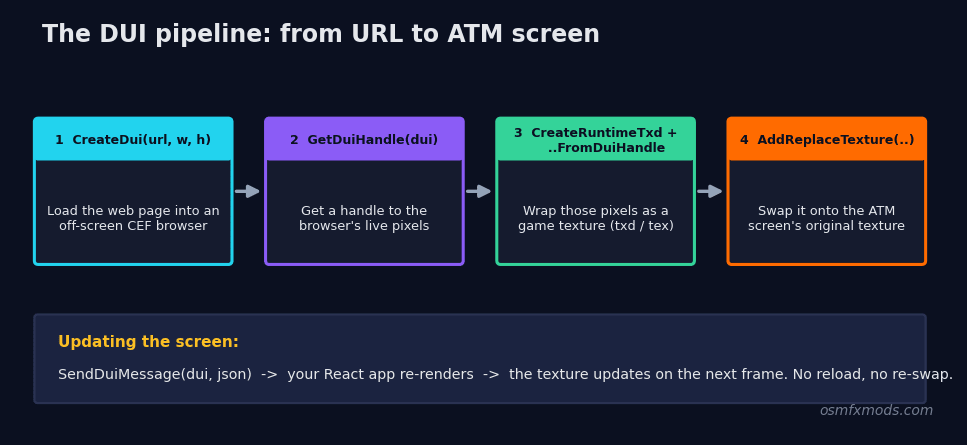 Diagram of the FiveM DUI pipeline: CreateDui loads the web page into an off-screen browser, GetDuiHandle exposes it, CreateRuntimeTxd plus CreateRuntimeTextureFromDuiHandle wrap it as a game texture, and AddReplaceTexture swaps it onto the ATM screen's original texture
First, you spin up the browser off-screen:
local url = ('nui://%s/html/index.html?dui=true'):format(GetCurrentResourceName())
DUI.duiObject = CreateDui(url, 1326, 1004)
DUI.duiHandle = GetDuiHandle(DUI.duiObject)
CreateDui loads your page into a browser that renders nowhere yet, at a fixed resolution (1326×1004 in our config — pick something that matches the aspect ratio of the screen you're targeting). GetDuiHandle hands you back a reference to that browser's output — the live pixels.
Next, you wrap those pixels as something the game can actually draw:
local txd = CreateRuntimeTxd('atm_dui_txd')
Wait(250) -- give the TXD a moment to register
CreateRuntimeTextureFromDuiHandle(txd, 'atm_dui_tex', DUI.duiHandle)
CreateRuntimeTxd makes an empty texture dictionary — think of it as a named folder the engine can look textures up in. CreateRuntimeTextureFromDuiHandle then drops your live browser output into that folder as a texture called atm_dui_tex. From here on, the game treats your React app as if it were any other image asset.
Finally, the magic swap:
AddReplaceTexture('prop_atm_01', 'prop_cashpoint_screen', 'atm_dui_txd', 'atm_dui_tex')AddReplaceTexture tells the engine: anywhere you would have drawn the ATM's original screen texture, draw mine instead. Every prop_atm_01 in the world now renders your live UI on its screen. Because it's a real texture on a real surface, it skews, lights, and sits in 3D space for free — you're not faking perspective, the engine is doing it.
To actually update what's on screen, you don't reload anything. You message the page just like NUI, but with the DUI-specific native:
SendDuiMessage(DUI.duiObject, json.encode({ action = 'SET_SCREEN', data = { screen = 'balance' } }))Your React app listens for that message and re-renders. The texture updates automatically on the next frame.
One non-obvious gotcha we hit: CreateRuntimeTextureFromDuiHandle can fail silently if you call it the instant you make the TXD. A short Wait(250) after CreateRuntimeTxd — and another brief wait for the page to load before you rely on it — saved us a lot of "why is the screen black" debugging. The texture system needs a beat to catch up.
The real problem: how do you click a screen that has no cursor?
Here's the wall everyone hits. Your beautiful UI is now a texture warped onto a machine in 3D space. A player walks up… and there's no mouse. There's no cursor on that ATM screen. FiveM does expose SEND_DUI_MOUSE_DOWN / SEND_DUI_MOUSE_MOVE natives, but they take browser coordinates — an (x, y) inside the 1024×1024 page. You don't have that. You have a player looking at a skewed quad somewhere in Los Santos. Translating "the player is looking at the top-right of a tilted screen 40 metres away" into "pixel (812, 190) of the browser" is genuinely nasty geometry.
So we flipped the problem around. Instead of turning a world look-point into a screen pixel, we project the buttons out into the world and check what the player is aiming at.
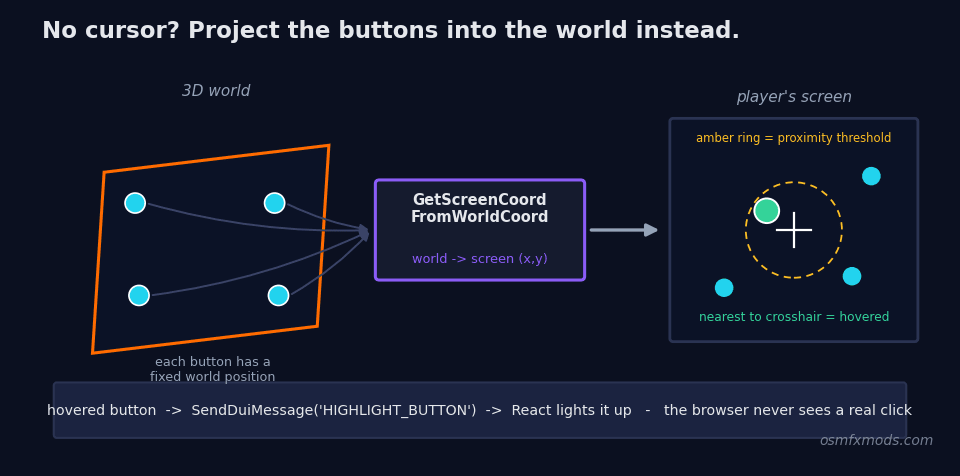 Diagram of the DUI button projection technique: each physical ATM button has a 3D world position, GetScreenCoordFromWorldCoord projects those into 2D screen coordinates, the code measures each one's distance from the center crosshair, and the nearest within range is sent to the UI as a highlight via SendDuiMessage
The trick works like this. Every button on the ATM face has a fixed offset from the prop's origin. When a session starts, we rotate each of those offsets by the ATM's heading and add it to the machine's world position — giving us the real 3D coordinate of every button in the world:
local rotatedOffset = RotateVectorByQuaternion(btn.offset, headingQuat)
local worldPos = atmCoords + rotatedOffset
Then, every frame, we do the reverse of a mouse click. We lock the camera to the machine and put a small crosshair dead-center. For each button, we ask the engine where its world position lands on the screen, and measure how close that is to the center:
local onScreen, screenX, screenY = GetScreenCoordFromWorldCoord(worldPos.x, worldPos.y, worldPos.z)
local dist = math.sqrt((screenX - 0.5)^2 + (screenY - 0.5)^2)
if dist < proximity then
    hoveredButton = btn.id
end
Whatever button is nearest the crosshair (within a small threshold) is the one the player is "hovering." We push that to the UI with a message so React can light it up, and if they left-click, we fire the button's logic and send a click animation back to the page:
if hoveredButton ~= prevButtonId then
    SendDuiMessage(duiObject, json.encode({ action = 'HIGHLIGHT_BUTTON', data = { buttonId = hoveredButton } }))
end
The player never actually touches the browser. They aim a crosshair at a machine; we do the 3D-to-2D math; the UI just receives "highlight button 5" and "click button 5" as plain messages. From the outside it feels like pointing at a real screen. Under the hood it's raycasting-by-projection, and the browser is blissfully unaware anyone is interacting with it at all.
The details that bite
A few honest caveats, because DUI is powerful but it's not a free lunch.
AddReplaceTexture is experimental. The native is officially flagged as such, and it has a real history of breaking between client branches — it's worked reliably on Release while misbehaving on beta/latest builds at various points. If you ship something on DUI, test it across the branches your players actually run.
You have to find the right texture name. Swapping the ATM screen means knowing the exact texture dictionary and texture name the game uses for that prop's screen — prop_cashpoint_screen for prop_atm_01, prop_fleece_emis for the Fleeca ATM, and so on. These aren't documented anywhere tidy; you dig them through model-viewing tools or lean on prior art. Get the name wrong and you're either replacing the machine's plastic housing or nothing at all.
One browser, one texture — mind your resolution. A ~1300×1000 DUI is a full off-screen Chromium surface being uploaded to the GPU. It's cheap when it's a single ATM you only render during a session, but DUI is not something you want running on fifty props at once with no lifecycle management. We create the browser on demand and tear it down (DestroyDui, RemoveReplaceTexture) when the session ends.
So when should you actually reach for DUI?
Not for your HUD. Not for your inventory. Those want to be crisp, fullscreen, and mouse-driven — plain NUI is the right tool and always will be.
DUI earns its keep the moment a UI should feel like it belongs to an object in the world: an ATM screen, a gas-pump display, a laptop, a TV showing a live feed, an in-world advertising board, a nightclub visualizer. Anything where "the interface is part of the scene" is the whole point. That immersion is exactly what a fullscreen panel can never give you, and it's why we went down this road for the ATM instead of shipping one more menu that covers the screen.
The difference between "a menu opened" and "I'm using that machine" is entirely in whether the UI lives in the world or on top of it. DUI is how you cross that line.
Once you've seen a real, animated web app sitting on a screen in 3D space — reacting as you point at it — it's hard to go back to fullscreen panels for anything that's supposed to feel physical.
We build this kind of thing for a living. The OsmFX ATM system is open source if you want to read the full implementation, and if you're after polished, performance-first scripts and UIs for your QBCore, ESX, or QBOX server, have a look around the store. We care about the details that make a server feel real.