
Every FiveM developer hits this wall at some point. You've built a clean inventory or a HUD, you want that frosted-glass look everyone loves — a soft blur of the game showing through your panel — so you reach for the one line of CSS that does it everywhere else on the web:
.panel {
  backdrop-filter: blur(12px);
}
And… nothing. Or worse, a flickering mess, or a flat black rectangle where the blur should be. You didn't do anything wrong. This is one of those FiveM quirks that looks like a bug in your code but is actually baked into how the game renders your UI in the first place.
I've shipped a lot of NUI over the years at OsmFX, and this is easily in the top five "why is this not working?" questions I get. So let me explain what's actually happening under the hood — not just "it doesn't work, use an image instead," but why, so the next time you design a UI you know exactly what you're fighting.
The short version: backdrop-filter blurs the pixels behind an element within the browser's rendering context. In a standard FiveM NUI page, there are no game pixels behind your panel for CSS to sample. The game and your UI are rendered separately and only composited together at the very end, so backdrop-filter has nothing meaningful to blur.
How FiveM actually draws a single frame
When you play FiveM, what you see on screen isn't one image. It's two layers, rendered by two different systems and blended together right at the end:
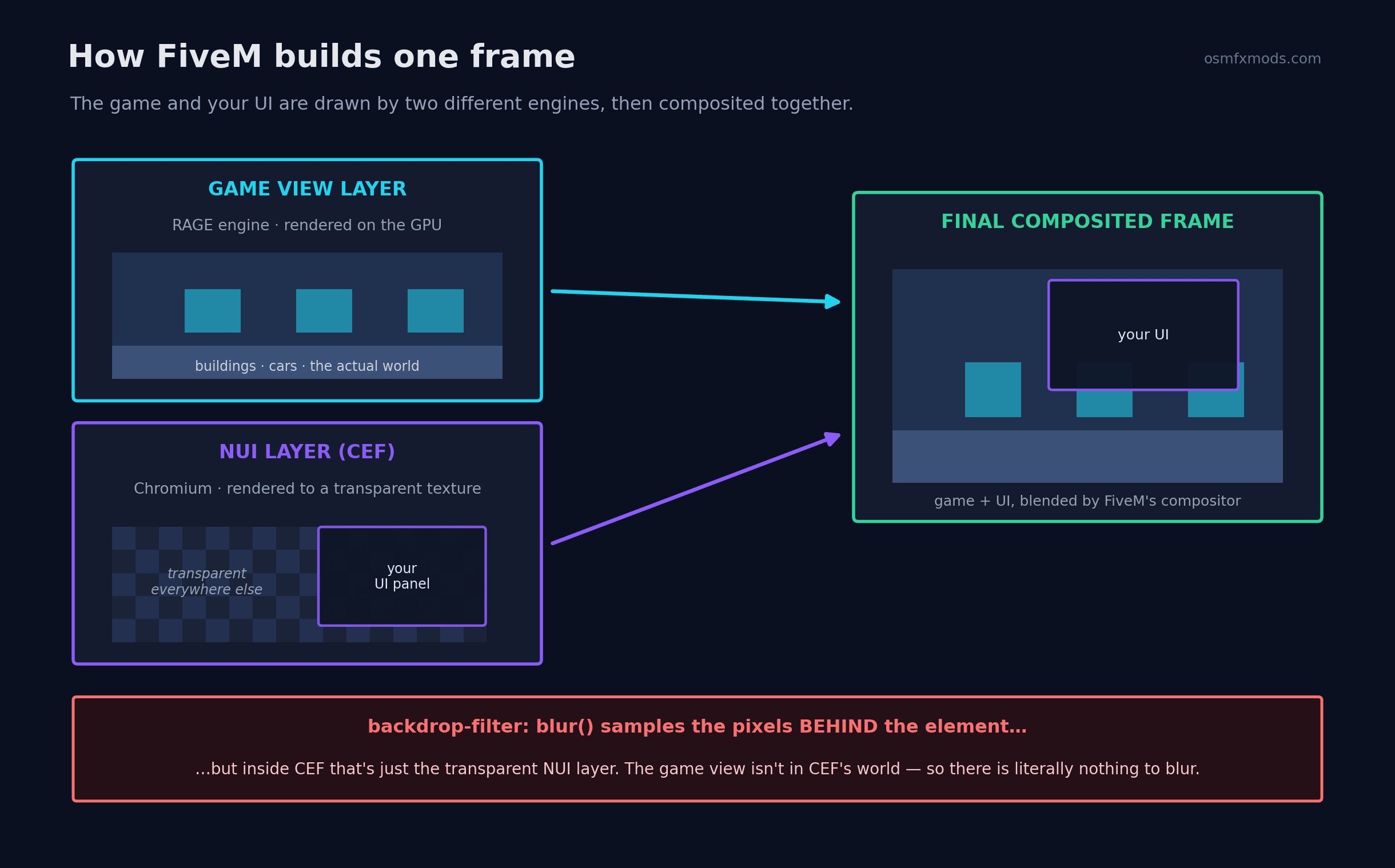 Diagram showing FiveM's game view layer rendered by the RAGE engine and the NUI CEF layer rendered to a transparent texture, composited into the final frame, with a callout explaining backdrop-filter blur has nothing to sample
The game view — Los Santos, cars, players, everything — is rendered by Rockstar's RAGE engine on the GPU. Your UI is something else entirely: FiveM embeds Chromium Embedded Framework (CEF), and your NUI resource is just a web page running inside it. CEF renders that page to its own transparent surface — think of a sheet of glass with your UI painted on it and transparency everywhere else.
Finally, FiveM composites the browser surface over the game frame to produce what you see on screen.
Here's the catch: a normal NUI page never receives the game's rendered image as part of its DOM or CSS rendering context. From the browser's point of view, behind your panel there is no street, no car, no sky — only transparency. So when backdrop-filter asks, "what's behind me so I can blur it?", CEF has no game pixels to sample. Depending on the Chromium version and GPU, that can result in no blur at all, black artifacts, or inconsistent rendering.
The blur isn't broken. It's doing exactly what it's designed to do — there simply isn't a browser backdrop containing the game image.
The second wall: every resource is its own sealed box
Even if you got clever, there's another layer of isolation. Every NUI resource on your server runs in its own fullscreen iframe. Your HUD, your inventory, your phone — each is a separate browser context that can't directly access the DOM of another resource.
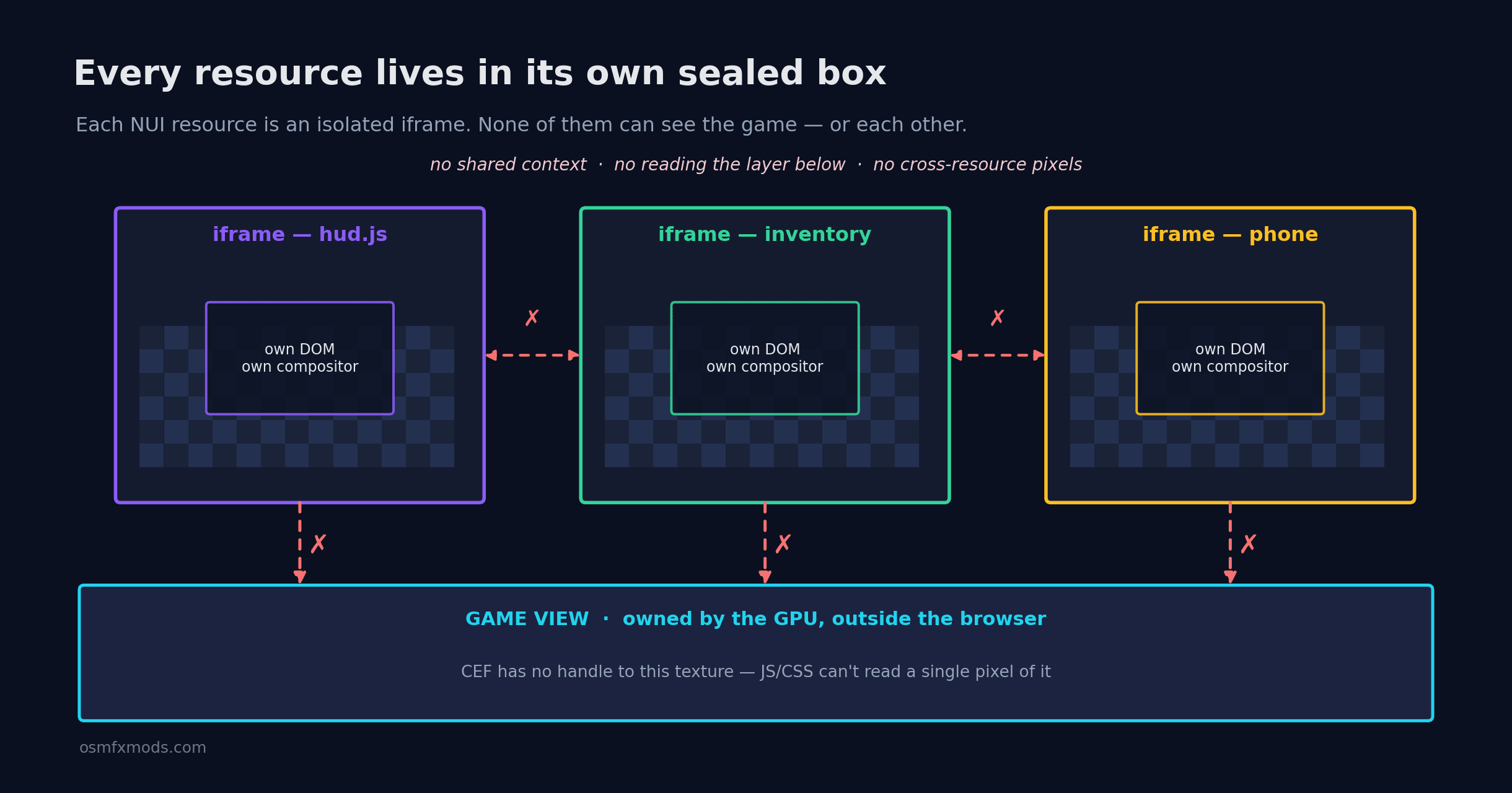 Diagram showing three FiveM NUI resources (hud, inventory, phone) each sealed in its own iframe, with blocked connections to each other and to the game view layer owned by the GPU
This is great for stability — a broken script can't take down every other UI — but it's also why you can't simply "grab the frame behind me and blur it" in JavaScript. There's no shared browser canvas containing the game framebuffer, no API that lets ordinary NUI pages read the rendered game image, and no direct DOM access between resources. Those boundaries are intentional.
"But the FiveM main menu has a blur!"
Right, and this is the part that drives people crazy. The FiveM main menu and some built-in interfaces do show a blurred game background. So it's clearly possible?
It is, but not through ordinary backdrop-filter alone.
FiveM exposes special functionality such as x-cfx-game-view / CfxTexture that allows the live game view to be presented as an element inside certain CEF contexts. Once the game image exists as an actual browser-rendered element, CSS filters have real pixels to work with. The interface isn't blurring "whatever happens to be behind the page" — it's blurring a game texture that has been explicitly exposed to CEF.
That functionality exists, but it's relatively specialized, sparsely documented, and not a drop-in replacement for the average inventory or HUD.
What you can actually do about it
Here's what holds up in production, roughly in order of how much pain each one saves you.
Design around it — fake the blur
Ninety percent of the time, the practical solution is to fake it. Use a pre-blurred background image, a blurred artwork, or another design treatment that gives the same visual feel. Pair it with a semi-transparent overlay like rgba(0,0,0,0.5) and most players will never notice the difference.
It performs well, behaves consistently, and doesn't depend on browser quirks.
Lean into solid, tinted, or gradient panels
A well-designed opaque UI with good spacing, subtle borders, and tasteful transparency often looks more polished than an inconsistent live blur. Some of the cleanest FiveM UIs never use blur at all.
Use the game-view APIs if you truly need live blur
If a live, animated blurred background is genuinely a requirement, then it's worth exploring approaches built around x-cfx-game-view / CfxTexture. Some developers integrate these into more advanced rendering pipelines, including custom Three.js-based approaches.
This is significantly more complex, may require maintenance across FiveM updates, and is best reserved for flagship interfaces where the visual effect justifies the engineering cost.
Consider DUI for special cases
For render targets and in-world screens, DUI (Direct-rendered UI) is a different rendering path with different capabilities. It's useful to understand, but it doesn't make ordinary HUD backdrop-filter effects suddenly work.
One thing I'd avoid is spending an entire weekend trying to force backdrop-filter to behave in a normal NUI page. Chromium support inside FiveM has historically lagged behind the latest desktop Chrome releases, and rendering behavior can vary between versions and hardware. Even where the CSS property is recognized, it still lacks access to the game's framebuffer in a standard NUI context.
The takeaway
The reason backdrop-filter: blur() doesn't work in a normal FiveM NUI isn't because your CSS is wrong — it's because of how the rendering pipeline is designed. The game and your browser UI are rendered separately, and a standard NUI page has no access to the game's pixels while CSS is being evaluated. On top of that, every resource runs in its own isolated browser context.
Once that clicks, a lot of other NUI quirks start making sense too: why you can't read the game's framebuffer from JavaScript, why resources can't directly style each other, and why certain effects that work perfectly on the web don't translate directly into FiveM.
Good FiveM UI development is mostly this: understanding where the engine's boundaries are, and designing with them instead of fighting them. Blur is simply one of the first walls almost every developer runs into.
If you understand where the renderer's boundaries are, you stop writing CSS that fights them — and your UI ends up cleaner because of it.
At OsmFX Mods we build performance-first scripts and UIs for QBCore, ESX, and QBOX servers — the kind that look sharp without fighting the renderer. If you're putting together a server and want UI that actually holds up in production, browse the store.
Got a FiveM quirk you want explained like this? That's exactly the kind of thing we write about here.