
Tick Rate, Explained: What FiveM's Jump to 120 Updates a Second Actually Means
If you've shopped for FiveM hosting in the last few years, you've seen the word "tick rate" used as a selling point. High tick rate, better tick rate, 128 tick. It gets thrown around like RAM or CPU cores, as if it's a number you buy more of and everything gets smoother.
Then Cfx published their development update for FiveM on GTAV Enhanced and dropped this line: server operators can now configure sync up to 120 updates per second, up from the previous 30. A lot of people nodded at that, and a fair number of them, honestly, had no concrete idea what it meant.
So let me actually explain it from the ground up. Not the config value, the concept. What a tick is, why every multiplayer game in existence has one, what your client is quietly doing between them, and then what specifically changed in FiveM and whether you should touch the setting at all.
The one-sentence answer
A tick is one complete pass of the server's simulation loop, and the tick rate is how many of those it runs per second. Everything else in this post follows from that sentence.
Your server does not watch the world, it takes photographs
Here's the mental model that makes the rest of this click.
It's tempting to imagine a game server as something that continuously watches the world unfold. It doesn't. It can't. A server is a program running on a CPU, and CPUs do things in discrete steps. So the server works in rounds. Each round it reads whatever input has arrived, moves everything forward a small slice of time, resolves what happened (this car is now here, that bullet hit that ped, this door is now open), and then sends out a summary of the new state to the players who need to know about it.
That round is a tick. Do sixty of them a second and you have a 60 tick server.
The consequence people miss: between two ticks, nothing happens on the server. The world is frozen from its point of view. If a car moves across a junction in the gap between tick 41 and tick 42, the server doesn't see a smooth arc. It sees the car at point A, then at point B. It's a flipbook, not a film.
This is not your frame rate. Your client might be rendering at 144 FPS while the server it's connected to is thinking at 30. Those are two completely separate clocks, and the gap between them is exactly why the next section exists.
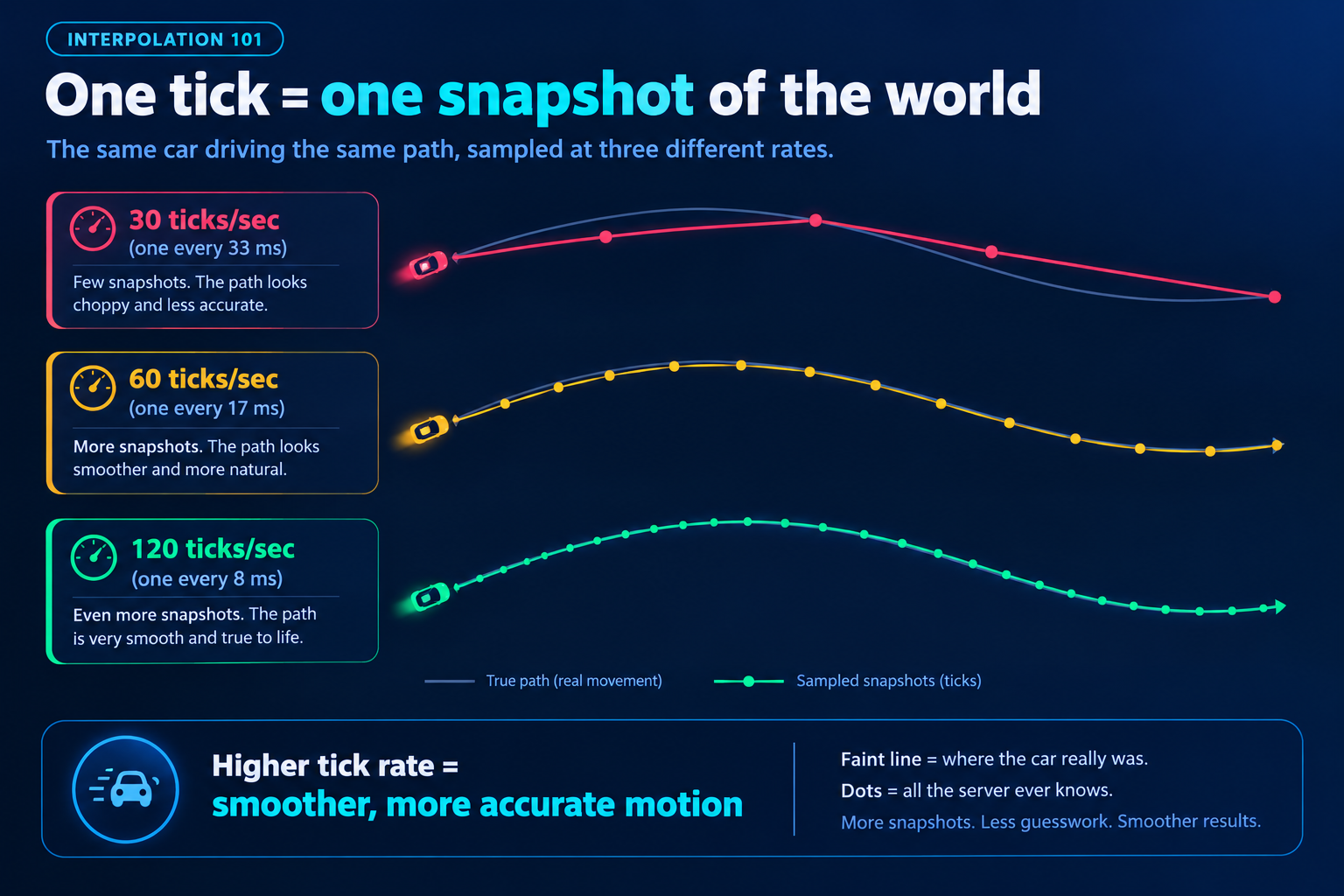 Diagram showing the same car path sampled at 30, 60 and 120 ticks per second. A faint line shows the real movement while coloured dots show the sparse positions the server actually records, with far more dots at higher rates
Why not just crank it to a million
If more ticks means a fresher view of the world, why does any server run at 30?
Because a tick isn't free. Every single one costs CPU time, and that cost scales with how much world there is to simulate: number of players, number of entities, how much each of them is doing. Double the tick rate and you've roughly doubled the per-second cost of the simulation, and you've also roughly doubled how much sync data you're pushing out to every connected player. On a 64 player roleplay server with hundreds of vehicles and props streamed in, that is not a rounding error.
Cfx's own documentation for the new setting says it plainly:
Tick rate for the sync thread. Higher values can reduce latency but increase CPU usage.
That's the entire tradeoff in one line. Tick rate buys you a server with a fresher opinion about where everything is, and it pays for that with the CPU your scripts were going to use.
What your client does in the gaps (this part is the real magic)
A name worth knowing before we go further. Gabriel Gambetta wrote a free series called Fast-Paced Multiplayer, which is probably the clearest plain-English explanation anywhere of how networked games hide latency. It's four short articles plus a live demo, it's engine-agnostic, and it's the thing I point people at when they want to understand this properly. I'm quoting it a few times below because he phrases things better than I would.
Here's the problem it solves. If your client simply drew other players exactly where the last server update said they were, multiplayer games would look terrible. At 10 updates per second, Gambetta notes, you'd get "very choppy movement, that is, discrete jumps every 100ms instead of smooth movement."
Games fix this with three techniques that show up in basically every networked title, GTA included.
Entity interpolation
Instead of drawing other players at the newest known position, your client deliberately draws them slightly in the past, and smoothly plays back the movement between two snapshots it already has. In Gambetta's words, you're showing "actual movement data, except you're showing it 100 ms 'late'."
You get smooth motion, and you pay for it by having everyone else on your screen be a fraction of a second behind reality.
Which raises a fair question, and it's one I got asked while writing this: if everyone I can see is late, how come voice chat feels perfectly in sync? You talk to someone in a server, they wave while they say something, and the wave lines up with the words. Where did the delay go?
Three things are happening.
The delay is small, and it applies to everything equally. Your client isn't delaying the player model but not the voice. Everything arriving from the network is late together, by roughly the same amount, so nothing on your screen contradicts anything else on your screen. Their animation, their gesture and their words are all about a tenth of a second old, which means they line up with each other.
There's no shared stopwatch in the room. The mismatch isn't between the picture and the sound, it's between my view of the world and your view of the world. In conversation there is nothing to compare those against. Neither of us can see the other's screen, so neither of us can catch the difference.
And where it isn't perfectly aligned, we can't tell. Voice and entity sync are separate systems with separate delays, so some drift between them is inevitable. It just doesn't matter, because we are terrible measuring instruments at this scale. Broadcast engineers have put a number on exactly how far sound and picture can drift apart before a person notices at all: the broadcasting standard ITU-R BT.1359-1, "Relative timing of sound and vision for broadcasting", puts the detectability threshold at roughly 45 ms of audio ahead of video to 125 ms behind it. A tenth of a second of drift sits comfortably inside the range where people register nothing at all.
The moment this stops being free is the moment two players need to agree on an exact instant: who shot first, whose bumper hit whose door, who got through the gate. That's where the third technique comes in.
Client-side prediction
Your own vehicle can't be late, or the game would feel like driving through syrup. So your client simulates your own inputs immediately and locally, then reconciles with the server's version when it arrives. This is why, in a laggy session, your own car drives fine while everyone else stutters.
This is the same split I wrote about in the raycasting post: shape tests run against the local physics world, so only the client can answer "what am I looking at right now." The client casts the ray, reports the result, and a well-built script then has the server validate that result rather than trusting it. Predict locally, confirm authoritatively. That pattern is everywhere once you start looking for it.
Lag compensation
This one deserves more than a sentence, because it's the least intuitive of the three.
When you pull the trigger, the target on your screen was drawn from data that was already old. It came from a server snapshot, which your client then deliberately held back for interpolation, on top of however long the packet took to reach you. Call it 100ms, conservatively. By the time your "I shot at that spot" message gets back to the server, more time has passed again.
So the server has a decision to make. If it tests your shot against where everything is now, you'd miss, because your target has moved since the frame you aimed at. You'd have to lead every single target by your ping, which is unplayable.
Instead, the server keeps a short history of where every player has been. When your shot arrives, it rewinds the world back to the state you were actually looking at when you fired, checks the shot against that older state, and then returns to the present to apply the result. You aimed at what you saw, and the server agrees with what you saw.
That is also the explanation for the most complained-about moment in online shooters: getting killed after you're already behind cover. On the shooter's screen you were still out in the open, the server rewound to their view, and their shot legitimately landed. Nobody cheated. Two people just disagreed about what "now" meant.
Put all three together and you get the honest picture: tick rate sets the size of the gap, and these techniques are what everything else uses to paper over it. Raising the tick rate doesn't add smoothness directly. It shrinks the amount of guessing and back-dating the system has to do.
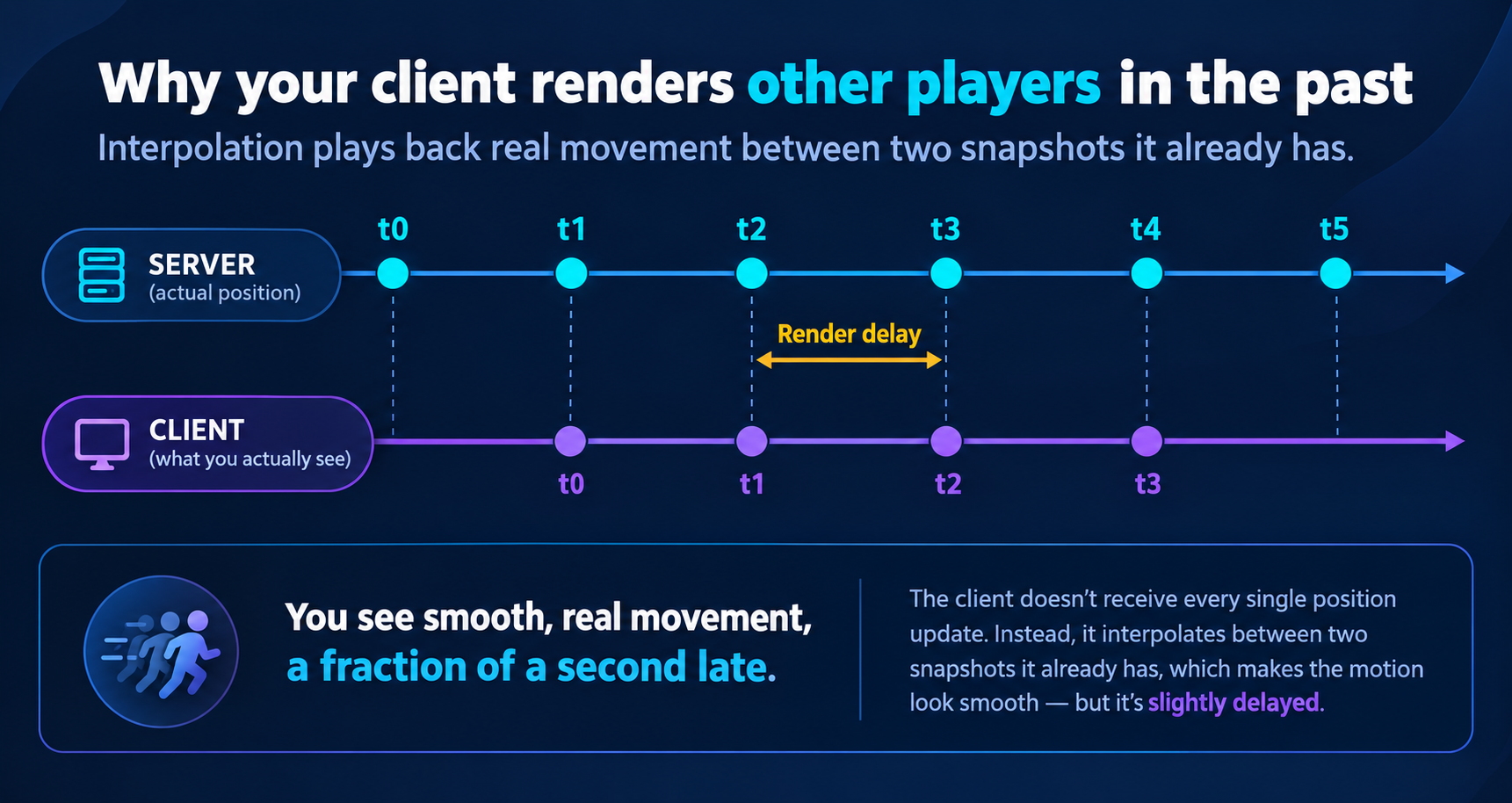 Timeline diagram with a server lane showing snapshots t0 to t5 and a client lane below it. The client lane is shifted later in time, playing back movement between two snapshots, with the offset labelled render delay
How other games handle it, for scale
It helps to see the numbers other studios land on, because it tells you what "high" even means.
Riot runs VALORANT at 128 ticks per second and is unusually open about the engineering. In their netcode writeup they describe it as a hard guarantee: "clients and servers always update movement, physics, and other related systems with a fixed timestep: exactly 128 times per second."
What's instructive is what they say it buys them. Riot works through peeker's advantage, the edge the player swinging around a corner has over the player holding it, and this is where everything above connects up, so it's worth walking the chain.
The peeker's own client draws their movement instantly, because of client-side prediction. They see around the corner the moment they move. The defender, meanwhile, learns about it only after that movement has travelled: up to the server, waited for a tick to be processed on, been sent back out, sat in the defender's interpolation buffer, and finally been rendered and pushed out of their monitor. Every one of the delays we covered stacks on the same side.
Riot budget it in fractions of a server frame: "0.5 frames" waiting for the point in the frame where input gets queued, "0.5 frames" of network buffering, "1 frame" where the move is applied and output, and then three more frames of client-side buffering and rendering. Plugging in 128 tick servers and 35ms latency, they conclude that "peekers have ~141ms longer to react than defenders." All their investment in tick rate and infrastructure shaved off "~40ms (28%) of our baseline peekers advantage."
Notice what a "frame" is in that budget: 1 divided by the tick rate. That's the actual mechanism by which tick rate helps. It doesn't make the network faster or the speed of light shorter. It makes each waiting room smaller. At 30 ticks a server frame is 33ms; at 120 it's 8ms. Same chain, shorter queues.
And read Riot's result twice, because it's the honest lesson. A studio with their resources, running a 5v5 shooter on a small map, at 128 ticks a second, still ends up with a meaningful timing asymmetry. They reduced it by a bit under a third. They did not delete it.
Now compare the workload. VALORANT: ten players, one enclosed map, no traffic, no pedestrians, no persistent world. A FiveM roleplay server: dozens to hundreds of players spread across an entire city, plus vehicles, peds, props, doors, and whatever your scripts are spawning. What is cheap to simulate 128 times a second in a small arena shooter is a very different proposition in Los Santos. That context is why FiveM's numbers historically looked the way they did.
How FiveM used to work
FiveM's sync story has two eras, and knowing both is what makes the Enhanced change make sense.
Era one: the server as a mailman
GTA's own multiplayer was built peer to peer, and FiveM inherited that. With OneSync turned off, the Cfx server commands documentation describes the onesync convar's off mode exactly like this:
No state awareness at all, clients will use the standard GTA/RAGE P2P networking model, and the server will only function as a relay.
Read that carefully, because it's a fundamentally different architecture from what most people assume. The server wasn't simulating your world. It was forwarding messages between clients who were simulating it themselves, each one owning some slice of the entities.
Which raises the obvious question: if the server was just a relay, what stopped everybody cheating?
Two answers, and the first one surprises people.
The sync layer and your script layer were never the same system. Even in relay mode, your server-side Lua was still running on the actual server, and it was the only thing that could reach your database. ESX or QBCore never asked a client how much money it had, they looked it up server-side and wrote it back server-side. So a player's bank balance was server-authoritative long before entity sync was, because it lived in a completely separate system that the P2P model never touched. The onesync setting governs state awareness of entities, not whether your server runs code.
But everything the sync layer did own, the client really did control. Its ped's position, its vehicle's state, the entities it owned: those were its property to report, and the network took its word for it. That is the structural reason old FiveM security advice is shaped the way it is. The advice was never "validate positions in the sync layer," because you couldn't. It was never let a client tell you something that matters. Any event that moves money or items has to re-derive the truth on the server, which is exactly the trust boundary I went through in the anti-patterns post.
Era two: OneSync
OneSync is probably the most consequential thing Cfx has built, and "it gives you more slots" badly undersells it.
The vanilla model has a structural ceiling. Every client has to know about every other client, because they're all each other's sync partners, and that caps you around GTA Online's player count no matter how good your hardware is. It also means the client is the authority for whatever it happens to own.
OneSync inverts the relationship. The server becomes state aware: it keeps its own model of every entity in the world and decides which clients need to know about which entities. In Cfx's words, it "increases server slot count so more players can play on a server and at the same time it introduces better development standards including server-sided synchronization states for entities."
Three things fall out of that, and they're the three reasons every modern framework assumes OneSync is on:
Slots. With the server routing entity state instead of every client broadcasting to every other client, the ceiling moves from tens of players to, on OneSync Infinity, up to 2048. Part of that was mechanical: the object ID space had to be extended from 8192 to 65535 to even address that many things.
Server authority over entities. The server now has its own opinion about where things are, rather than taking a client's word for it. Server-side entity creation, entities locked so only the server can author them, and state bags all become possible. This is the layer that let "server-authoritative" go from a discipline you enforced in your own event handlers to something the platform actually supports.
Culling. The catch is that a state-aware server telling every client about every entity would be enormously wasteful. So OneSync only creates entities near a player, with the focus zone documented as "hardcoded to 424 units around a player." Necessary, and also the direct explanation for why distant things pop into existence as you drive toward them.
That's the era most live servers still run in today. But the send rate underneath it was modest. Per Cfx's development update, the old ceiling was 30 updates per second, or 40 with sv_useAccurateSends enabled. Roughly one sync update every 25 to 33 milliseconds. Culling had its own bottleneck too: previously "it ran on the sync thread and could only process around 16 players per tick," which is a fair explanation for why pop-in got noticeably worse as your server filled up.
What actually changed on Enhanced
FiveM for GTAV Enhanced entered public early access on July 21, 2026, and the sync layer was rebuilt rather than tuned. The headline change, straight from the Legacy vs Enhanced documentation:
FiveM for GTAV Enhanced no longer uses P2P synchronization and has instead switched to a client-server model.
That is the architectural end of era one. The relay is gone, and with it the last of the peer to peer model that every "never trust the client" lesson above was written against. Underneath it, the transport changed too: per development update #3, sync data now goes out as raw UDP packets with ENet retained for event based communication, and culling came off the sync thread so it "runs across multiple cores inside the sync pipeline, so entities appear around players much faster." That's the ~16 players per tick bottleneck from the OneSync section, gone.
And then the setting itself. sv_syncTickRate accepts a value from 1 to 120, and defaults to 60.
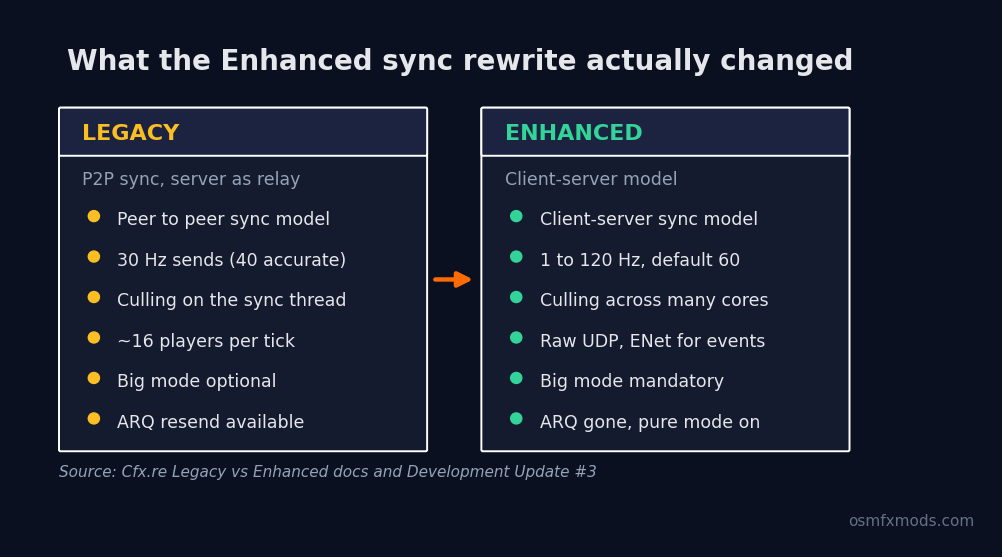 Side by side comparison of FiveM Legacy and Enhanced sync. Legacy: peer to peer sync, 30 Hz sends, culling on the sync thread, roughly 16 players per tick. Enhanced: client-server sync, 1 to 120 Hz with a default of 60, culling across many cores, raw UDP with ENet for events
Enhanced is early access at the time of writing, and Cfx have said plainly that it "will contain bugs and missing features," so treat these numbers as the current state rather than the final one. There's a lot more in that release than the sync rewrite, and it deserves its own article rather than a paragraph here.
What raising your tick rate actually buys you
So when is this setting worth spending CPU on? The useful way to think about it is that tick rate matters wherever two players have to agree on an exact moment or an exact position.
The clearest way to see it is in metres. A car doing 120 km/h covers about 33 metres every second. Work out how far it travels between two server updates:
That gap is the size of the disagreement the rest of the system has to smooth over. At 30 Hz, every other client's view of that car is being interpolated across a metre of road. At 120 Hz it's the width of a wheel. Nothing about the network got faster, but the window in which two players can hold different opinions about where that car is got four times smaller.
So the use cases the setting exists for:
Contested, high-speed contact. Racing and drifting side by side, police pursuits and PIT manoeuvres, ramming, anything where two vehicles are close together at speed. This is where players actually feel it, usually described as "his car teleported into me."
Gunfights. Same logic as the peeker's advantage chain above. Shorter queues mean less rewinding for the server to do and less disagreement about who was where.
Anything with fast-moving entities near each other. Helicopters, boats in a race, a chase through traffic.
And the flip side, where the money is better spent elsewhere: a heavy roleplay economy server where most of what's happening is people standing in buildings talking, running jobs, and opening menus. Nobody in that server is going to feel the difference between 60 and 120, and the CPU it costs is CPU your resources wanted.
What it will not fix
This is the part I want server owners to take away, because I can already picture people setting sv_syncTickRate 120 and wondering why nothing feels different.
It will not fix your resources. The sync thread and your script scheduler are different things. A resource sitting in a Wait(0) loop drawing markers for every player on the map is burning frames regardless of how often the server syncs entity state. If your resmon is red, tick rate is not your problem, and raising it just means the same starved CPU now has more work to do. I went through the specific patterns that cause this in the post on FiveM coding anti-patterns.
It will not fix ping or client FPS. Tick rate removes one source of staleness out of several. It does nothing about the 60ms of network latency between a player in Brazil and a server in Frankfurt, and nothing about a client rendering at 25 FPS because of a bloated asset pack. Look again at Riot's budget: the server frame is one term in a long chain.
It will not fix having too much stuff. If you've got a thousand streamed entities crowded into one district, the fix is culling and streaming discipline, not asking the server to think about all of them twice as often.
The practical advice, then, is boring and correct: the new default of 60 is already double what your server was getting before. Start there. If your server is the kind described above, try higher, but change one value at a time, watch your CPU and frame timings under real player load, and keep it only if you can point at the improvement. Setting it to 120 because it's the biggest number is exactly the kind of change that looks free on an empty test server and hurts on a full one.
Zooming out
Tick rate is really a question about resolution. It's how finely your server samples reality, and like any sampling problem, higher resolution costs you CPU and bandwidth while the client quietly interpolates, predicts and rewinds to make the gaps invisible.
That framing is more useful than any specific number, because it tells you when the setting is worth spending on and when it isn't. Fast, contested, precise interactions benefit from a fresher view. A busy city full of ambient traffic mostly benefits from the server having enough headroom left to run the scripts people are actually playing.
Tick rate doesn't make your server smooth. It shrinks the lie your client has to tell to make it look smooth.
The Enhanced rewrite matters because it moved the whole architecture, not just the number. Client-server instead of peer to peer, culling across multiple cores, a default that's twice what it was. The 120 is the headline. The architecture underneath it is the actual story.
At OsmFX Mods we build performance-first scripts for QBCore, ESX, and QBOX, written to stay cheap per tick so your CPU budget goes to the things players actually notice. If you'd rather install things that already respect the server's time, have a look around the store.
And if you're sizing up what any of this means for your own setup, that's exactly the kind of thing I like digging into here.